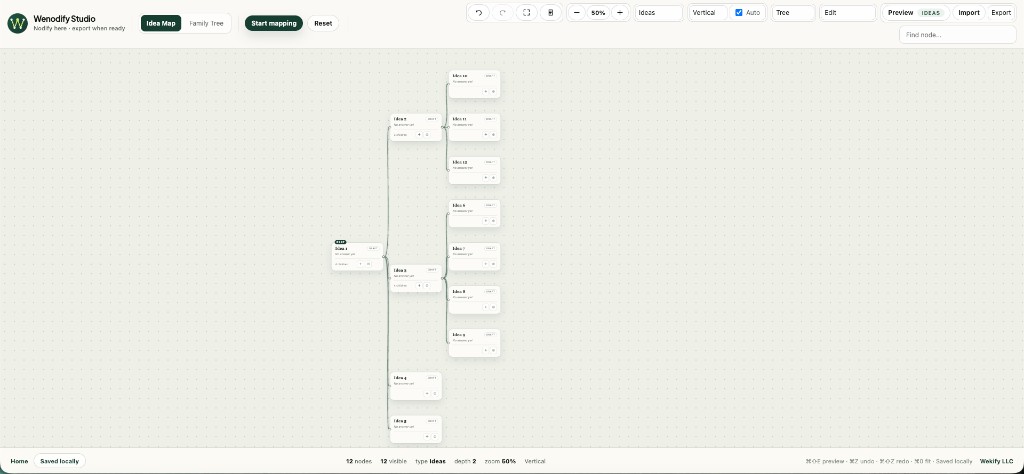
All seven types share the same mind map canvas and node fields: label, body, status, and parent_id hierarchy. Ideas is the closest to a classic concept map. What changes is default naming, preview shape, export filename, and the SQL export profile.
These types exist so you can author Kifuliiru conversations, questions, and lesson paths in Wenodify — then export them for Wekify language platforms — without changing the canvas. The same shapes work for any other language or subject.
Downstream loaders should read graph_type on the document row — do not treat every export as a generic mind map. See export & import.
Type
Preview
Label
Body
ideasIdeas
Desktop outline
Topic title
Notes, references, or longer copy
conversationConversation
Phone dialog
Spoken line or scene beat
Delivery or stage notes
chatbotChatbot
Phone chatbot
User question or prompt
Bot reply after a child option is chosen
quizQuiz
Phone quiz
Question text
Choices, answer key, or feedback
stepsSteps
Phone checklist
Step title
Instructions or completion detail
explorerExplorer
Tablet browse
Topic or entry name
Summary, media reference, or payload
cotChain of Thought
Phone reasoning
Problem or reasoning beat
Context, full thought, or conclusion
ideas
Ideas
Classic mind maps, concept maps, outlines, and planning trees.
When to use: Use when you are organizing thought the way you would on a mind map — product plans, curriculum outlines, research maps, or any concept map where hierarchy matters more than scripted interaction.
Preview: Opens as a desktop outline you can scroll and expand.
Node prefix:Idea
Example structure
Root: "Kifuliiru curriculum" → children: "Greetings", "Family terms", "Food vocabulary" with notes in each body field.
Authoring tips
Keep labels short — bodies hold the detail.
Use status draft for branches still being shaped.
Collapse large subtrees while you work on one section.
Export mapping: Loader reads label as topic title, body as notes, parent_id as hierarchy.
conversation
Conversation
Scripted dialog and guided scenes.
When to use: Use when you are writing a guided conversation script — root is the opening line, children are the next lines or branches, and body holds how the line should be delivered.
Preview: Opens as a phone dialog transcript with branch choices for the next line.
Node prefix:Line
Example structure
Root label: "A Kifuliiru greeting." → child label: "The learner replies." → body: "Warm, slow delivery."
Authoring tips
Root = opening line or scene title.
Child labels = the next spoken lines.
Body = optional delivery, tone, or stage direction.
Branch when the dialog can go in different directions.
Export mapping: Loader maps label to spoken line, body to delivery notes, parent_id to the previous line in the branch.
chatbot
Chatbot
Interactive chatbots with reply options and bot responses.
When to use: Use when someone should tap reply options and get bot answers — root is the opening question, children are reply options, and each option body holds the bot response.
Preview: Opens as a phone chatbot with back navigation between turns.
Node prefix:Turn
Example structure
Root label: "How do I greet an elder in Kifuliiru?" → child label: "Formal greeting" → body: "Use the respectful form from lesson 1."
Authoring tips
Root = the user's opening question or intent.
Child labels = reply options the user taps.
Child body = what the bot says after that option.
Add depth for follow-up turns — each level is another exchange.
Export mapping: Loader maps root to user question, child labels to options, child bodies to bot responses.
quiz
Quiz
Branching assessments and knowledge checks.
When to use: Use when learners should be tested or reinforced — each branch can lead to the next question or an explanation node.
Preview: Opens as a phone quiz with answer branches.
Node prefix:Question
Example structure
Label: "Which Kifuliiru greeting is formal?" → body lists options and marks the correct answer → children branch to the next question or feedback.
Authoring tips
Put the question in the label; choices and scoring notes in the body.
Branch wrong answers to explanation nodes when helpful.
Keep sibling order meaningful if options should appear in a set sequence.
Export mapping: Loader reads label as question, body as choices, feedback, or answer key.
steps
Steps
Procedures, checklists, and lesson paths.
When to use: Use when order matters — onboarding checklists, cooking or craft procedures, lesson sequences. Sibling order on the canvas maps to step order.
Preview: Opens as a step-by-step checklist with previous and next controls.
Node prefix:Step
Example structure
Step 1: "Gather materials" → Step 2: "Prepare the base" → nested sub-steps under Step 2 for detail.
Authoring tips
Sibling order on the canvas is step order — arrange before export.
Nest substeps as children when a step has internal sequence.
Bodies hold instructions someone follows while completing the step.
When to use: Use when readers should wander a knowledge space — glossaries, cultural topic indexes, or reference libraries where there is no single correct path.
Preview: Opens as a tablet topic browser with drill-down navigation.
Node prefix:Topic
Example structure
Root: "Kifuliiru topics" → "Ceremonies", "Food", "Proverbs" — each with a summary in the body and deeper children.
Authoring tips
Optimize for scanability — labels are entry points, bodies are summaries.
Depth can mirror taxonomy: category → subtopic → entry.
No required path — unlike conversation or steps, explorers are non-linear.
Export mapping: Loader maps label to entry name, body to summary or media reference, children to subtopics.
cot
Chain of Thought
Reasoning traces from problem to answer.
When to use: Use when you want to map how someone (or an AI) reasons through a problem — root is the question, children are ordered thoughts, and the last step is the answer.
Preview: Opens as a step-by-step reasoning walk with previous and next controls.
Node prefix:Thought
Example structure
Root: "If 3 apples cost $6, what do 5 cost?" → Thought 1: "Find unit price" → body: "$6 ÷ 3 = $2" → Thought 2: "Answer" → body: "$10".
Authoring tips
Root label = the problem or prompt.
Child labels = short reasoning beats (Observe, Deduce, Conclude).
Bodies hold the full reasoning text for each step.
Sibling order is the chain — arrange before export.