Wenodify

Tree types

Concept

Same canvas, different starting frame

All eight types share the same Family Tree canvas — partners on one generation row, children from the household midpoint, symmetric branches as the tree grows. What changes is the template you pick when you start: display name, description, default root label, and relationship hints that help you read the tree for your domain.

Exports include a treeType field so downstream loaders know how to interpret labels. The underlying fields stay the same: label, partnerId, parentIds, and depth. See export & import and the Family Tree studio guide.

TypeDefault rootStructure
family-genealogyFamily GenealogyFamily rootRoot person → partners → children → descendants
language-familyLanguage Family TreeProto-languageProto-language → language branches → dialects
clan-lineageClan & Lineage TreeAncestorAncestor → clan branches → living members
noun-classNoun Class TreeRoot noun classRoot class → subclasses → example words
word-etymologyWord Etymology TreeRoot wordRoot word → evolved forms → modern variants
dialect-mapDialect MapParent languageParent language → regional dialects → sub-dialects
org-chartOrg ChartOrganizationRoot organization → departments → roles
knowledge-domainKnowledge Domain TreeSubjectSubject → topics → subtopics
family-genealogy

Family Genealogy

Household genealogy — the default template for people, partners, and generations.

When to use: Use for multi-generation family records, household branches, and exportable genealogy you will share or archive.

Default root label: Family root

Partner hint: Spouse or partner on the same generation row

Child hint: Child of the household — drops from the couple midpoint

Example structure

Root: "Ada Lovelace" → partner: "William King" → children branch into their own households across generations.

Authoring tips

  • Start with your reference person as the root household anchor.
  • Activate placeholder partners before adding children to a branch.
  • Use collapse to hide distant branches while you work on one line.

Export mapping: Default tree type. Exports include treeType: family-genealogy; partner_id and parent_ids map to household relationships.

language-family

Language Family Tree

Linguistic descent — how a proto-language splits into branches and regional forms.

When to use: Use when documenting how a language family divides — comparative linguistics, curriculum maps, or preservation indexes.

Default root label: Proto-language

Partner hint: Sibling branch or closely related lect on the same level

Child hint: Descendant language, dialect, or lect below the parent

Example structure

Root: "Proto-Bantu" → branches: "Swahili", "Zulu", "Kikongo" → each with dialect children.

Authoring tips

  • Root = reconstructed or attested proto-form.
  • Generation rows = time depth or taxonomic level — not calendar years.
  • Label nodes with language names; use notes elsewhere if you need ISO codes.

Export mapping: treeType: language-family. Downstream loaders can treat partner links as coordinate branches and children as descent.

clan-lineage

Clan & Lineage Tree

Clan structure and living descent from a shared ancestor.

When to use: Use for clan registers, lineage documentation, and cultural kinship maps where branches split from a founding ancestor.

Default root label: Ancestor

Partner hint: Co-head of a clan branch or household line

Child hint: Member, sub-clan, or living descendant of the branch

Example structure

Root: "Founding elder" → clan branches → named members in the current generation.

Authoring tips

  • Root = the ancestor or clan founder everyone traces back to.
  • Branches often mirror household or sub-clan lines — grow each separately.
  • Rename inline as you confirm spellings with community sources.

Export mapping: treeType: clan-lineage. Same household canvas — export records which template framed the tree.

noun-class

Noun Class Tree

Grammatical noun-class systems — classes, subclasses, and exemplar vocabulary.

When to use: Use when teaching or documenting noun-class agreement — map classes to example lemmas learners can browse.

Default root label: Root noun class

Partner hint: Coordinate class or agreement set at the same level

Child hint: Subclass or example word belonging to the parent class

Example structure

Root: "Class 1/2 (people)" → subclasses → example words as leaf nodes.

Authoring tips

  • Root = the top-level class or agreement paradigm you are explaining.
  • Children = subclasses; leaves = example words or phrases.
  • Keep labels short — one word or short phrase per example.

Export mapping: treeType: noun-class. Loaders can project class hierarchy from parent_ids and treat leaves as exemplars.

word-etymology

Word Etymology Tree

Lexical history — how a root form develops across time and usage.

When to use: Use for etymology lessons, dictionary supplements, and showing how a lemma changed across periods or registers.

Default root label: Root word

Partner hint: Parallel form or cognate at the same historical layer

Child hint: Derived form, evolved spelling, or modern variant

Example structure

Root: "*sal-" → medieval forms → modern "salary", "salad", "salt" as branch leaves.

Authoring tips

  • Root = earliest attested or reconstructed form.
  • Each generation row can mean a historical stage or derivational step.
  • Branch siblings when forms split from the same parent source.

Export mapping: treeType: word-etymology. Export preserves the derivation tree; labels hold the surface forms.

dialect-map

Dialect Map

Regional variation — how a standard or parent lect splits into dialect geography.

When to use: Use for dialect atlases, fieldwork indexes, and teaching regional variation within one language.

Default root label: Parent language

Partner hint: Neighboring dialect or regional variant at the same level

Child hint: Sub-dialect, local variety, or community speech form

Example structure

Root: "English" → regional dialects → community sub-varieties under each region.

Authoring tips

  • Root = the parent language or standard lect.
  • Middle generation = named regional dialects.
  • Leaves = villages, communities, or sub-varieties you have recordings for.

Export mapping: treeType: dialect-map. Same tree skeleton — loaders read labels as lect names and hierarchy as geographic or social nesting.

org-chart

Org Chart

Organizational hierarchy — teams, departments, and roles reporting lines.

When to use: Use for team structure, nonprofit boards, project org charts, or any reporting hierarchy that reads top-down.

Default root label: Organization

Partner hint: Co-lead or paired role at the same level (optional)

Child hint: Department, team, or role reporting to the parent node

Example structure

Root: "Wekify LLC" → departments → role titles as leaf nodes.

Authoring tips

  • Root = organization or program name.
  • Middle rows = departments or teams.
  • Leaves = individual roles or named seats — rename as people change.

Export mapping: treeType: org-chart. Household layout still applies visually; export treeType tells loaders to read nodes as org units.

knowledge-domain

Knowledge Domain Tree

Taxonomic knowledge maps — subjects broken into topics and subtopics.

When to use: Use for curriculum outlines, glossary indexes, research bibliographies, and browse-by-topic knowledge bases.

Default root label: Subject

Partner hint: Sibling topic at the same level under the parent subject

Child hint: Subtopic or entry nested under the parent topic

Example structure

Root: "Traditional medicine" → topics: "Plants", "Rituals", "Practitioners" → subtopics under each.

Authoring tips

  • Root = the domain or course subject.
  • Prefer breadth at the top, detail as you descend.
  • Collapse large subtrees while you flesh out one topic area.

Export mapping: treeType: knowledge-domain. Hierarchy from parent_ids; labels are topic titles for downstream browse UIs.

Choose

Which type should I pick?

  • People and householdsfamily-genealogy
  • Language descent and comparative familieslanguage-family
  • Clan or lineage from a founding ancestorclan-lineage
  • Grammatical noun-class systems with examplesnoun-class
  • Historical word forms and derivationsword-etymology
  • Regional dialect variation within one languagedialect-map
  • Teams, departments, and reporting linesorg-chart
  • Subjects, topics, and browse-by-topic indexes knowledge-domain

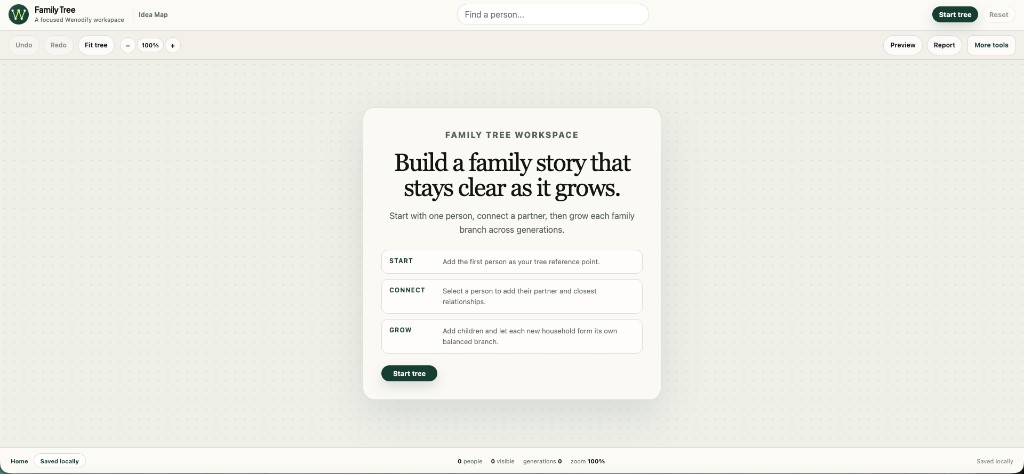
Missing treeType on import defaults to family-genealogy. Pick your template on the Family Tree empty state before you start — the canvas layout does not change, only the framing and export metadata.

Wenodify Family Tree empty workspace
Pick a tree type first — same canvas, different labels and export meaning.
Next steps

Ready to nodify?

Open a studio, try an example workflow, or read product context on About and Changelog.